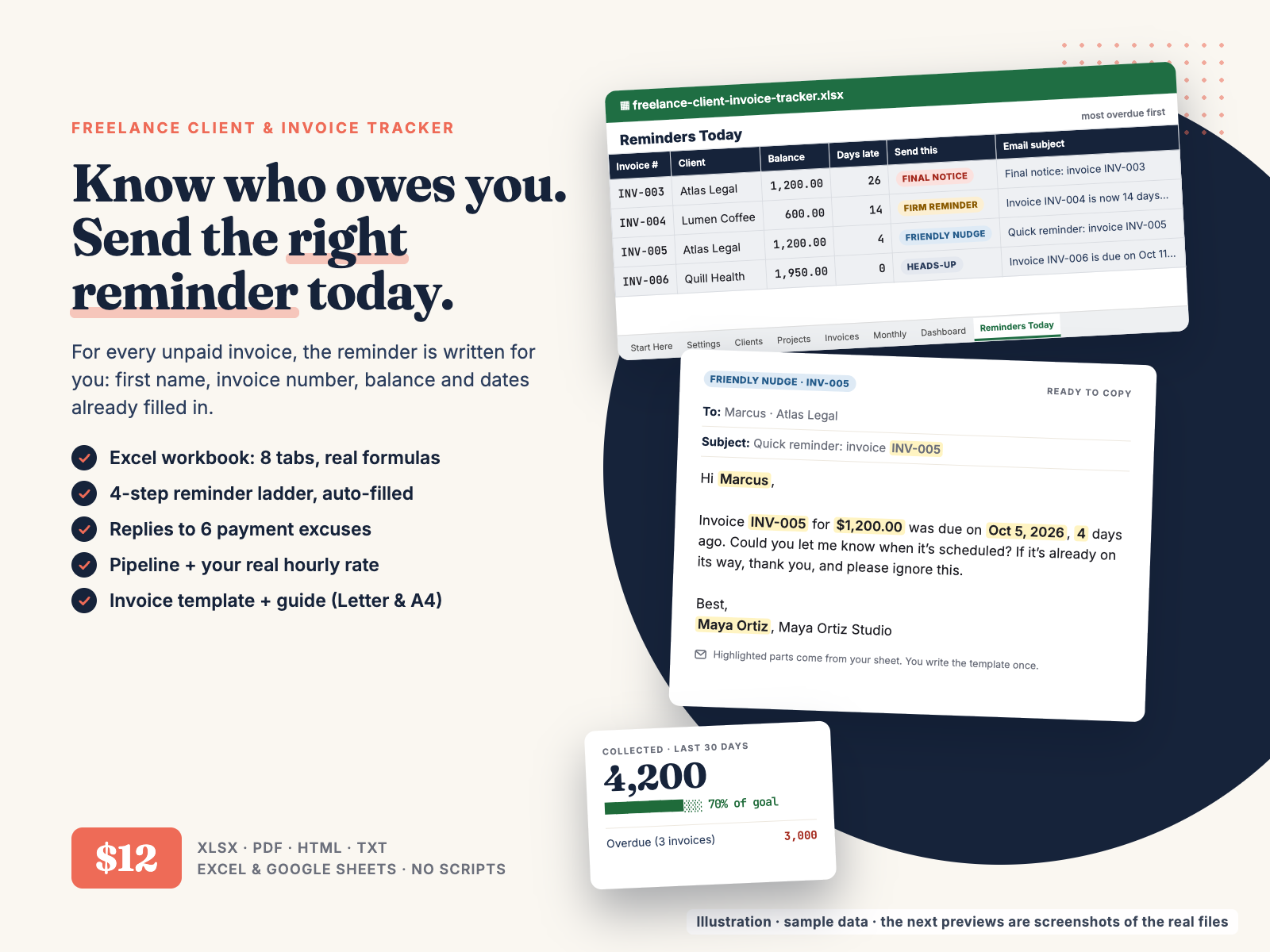
Know who owes you, send the right reminder today, and see whether next month reaches your goal. An Excel / Google Sheets tracker that writes the payment reminder for every unpaid invoice.
$12.00 USD, one-time payment, instant download, no subscription
Buy now: $12Secure checkout: payment is handled by Waffo Pancake, our merchant of record. Card payments are processed securely by Waffo and you get a receipt by email. We never see your card details. After payment you go straight to the download page.
14-day refund, no questions asked. If the tracker isn't right for you, email chenphien@gmail.com within 14 days of purchase for a full refund (the same policy as in the README; see Terms).
Satisfaction guarantee: if a file won't open or a formula doesn't work, reply to the email and you get a full refund.
New shop, honest about it. Hustle Studio is a small new shop, so this tracker has no reviews yet and we won't invent any. Instead, every image below comes from the real files, and the free sample further down is copied word for word from them. Support questions go to the same email and we reply within 2 business days. When we fix or improve the files, the new version goes on the same download page, so buyers get updates at no cost.
Walkthrough of the real file, calculated live.
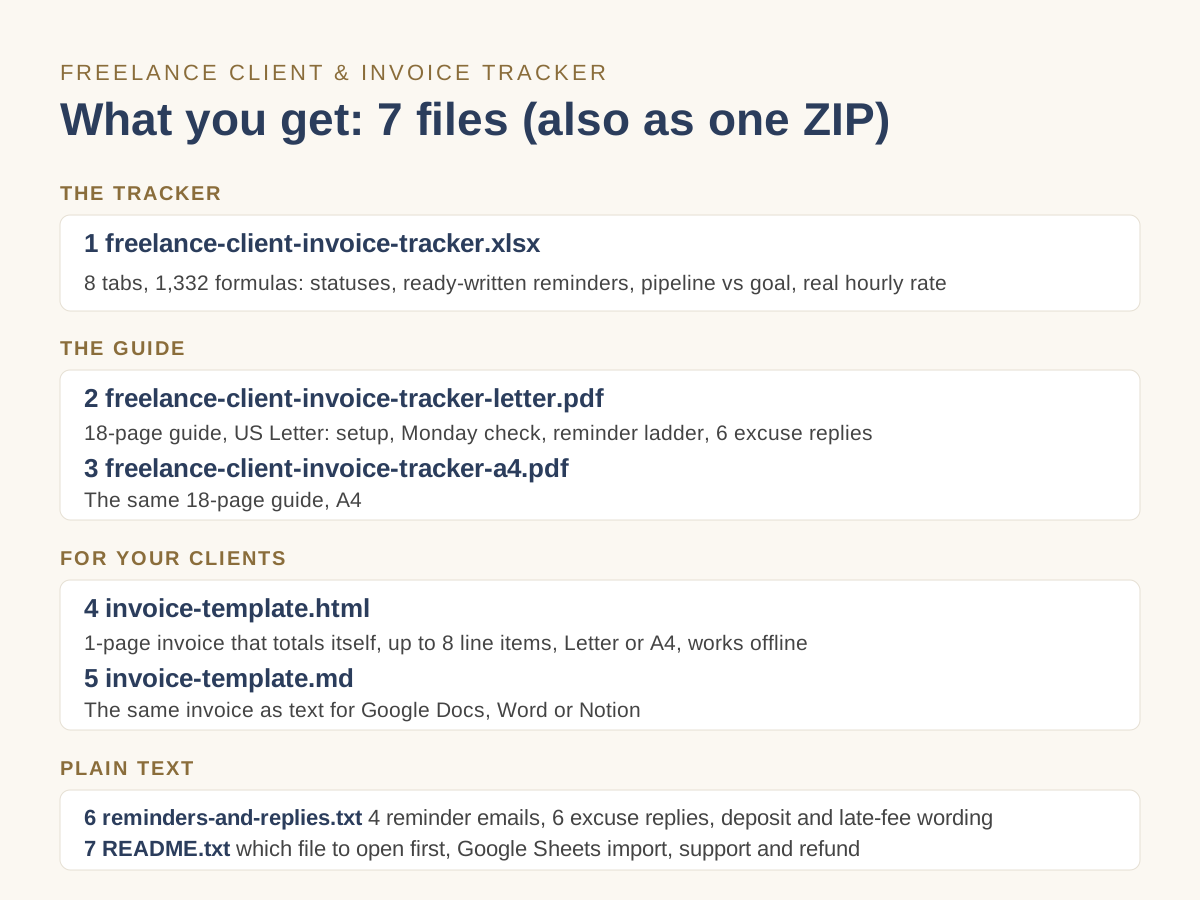
Everything comes in one ZIP, and the download page also has a separate link for each file.
freelance-client-invoice-tracker.xlsx: 8 tabs (Start Here, Settings, Clients, Projects, Invoices, Monthly, Dashboard, Reminders Today), 1,332 working formulas, sample data for 5 clients, 9 projects and 8 invoices.freelance-client-invoice-tracker-letter.pdf: guide, 18 pages, US Letter.freelance-client-invoice-tracker-a4.pdf: the same guide, 18 pages, A4.invoice-template.html: 1-page client invoice, up to 8 line items, Letter/A4, works offline.invoice-template.md: the same invoice as text for Google Docs, Word or Notion.reminders-and-replies.txt: 4 reminder templates, 6 excuse replies, deposit and terms wording, late-fee clause example.README.txt: which file to open first, Google Sheets import, support and refund.Files 1–4 are shown in the previews; invoice-template.md, reminders-and-replies.txt and README.txt are plain-text files (the free sample below is copied from reminders-and-replies.txt).
All images come from the real files.
Settings tab · the 4 reminder templates (also in reminders-and-replies.txt). The tracker fills in {first}, {inv}, {amount}, {due}, {days}, {paydate} and {me} for you on Reminders Today. Edit them once in your own voice.
Step 1 · Heads-up (due in 3 days or less)
Subject: Invoice {inv} is due on {due}
Hi {first}, a quick heads-up that invoice {inv} for {amount} is due on {due}. Everything you need to pay is on the invoice. Thanks, {me}
Step 2 · Friendly nudge (1–7 days late)
Subject: Quick reminder: invoice {inv}
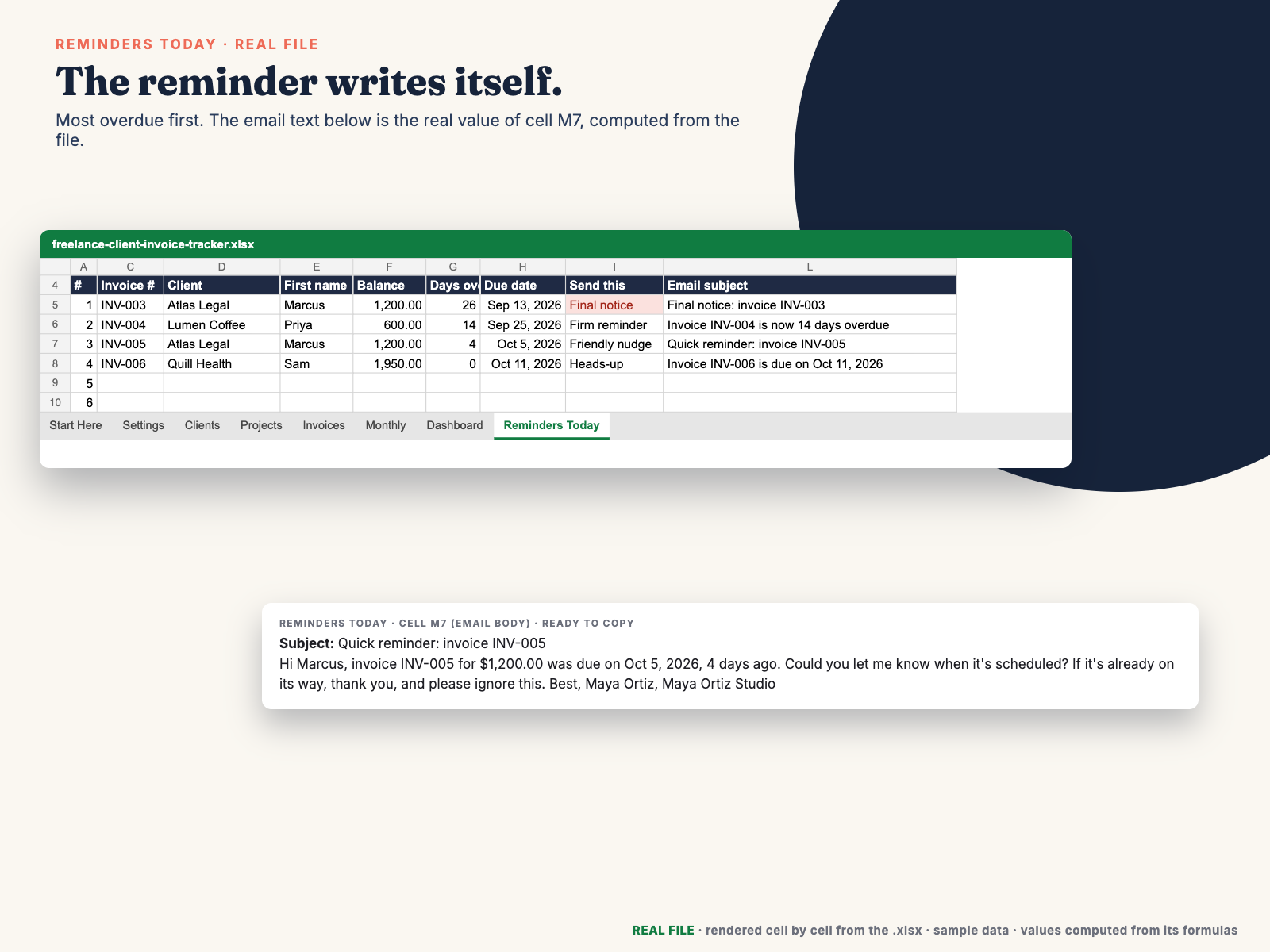
Hi {first}, invoice {inv} for {amount} was due on {due}, {days} days ago. Could you let me know when it's scheduled? If it's already on its way, thank you, and please ignore this. Best, {me}
Step 3 · Firm reminder (8–21 days late)
Subject: Invoice {inv} is now {days} days overdue
Hi {first}, invoice {inv} for {amount} was due on {due} and is now {days} days overdue. Please pay the balance of {amount} by {paydate}, or reply with the date it will be paid. Thank you, {me}
Step 4 · Final notice (22+ days late)
Subject: Final notice: invoice {inv}
Hi {first}, invoice {inv} is now {days} days overdue and I haven't had a reply to my earlier reminders. If the balance of {amount} isn't paid by {paydate}, I'll pause any further work{latefee}. If there's a problem with the invoice, please reply today so we can sort it out. Regards, {me}
Guide page 12 · Chapter 5, Get paid on time next time
Ask for a 50% deposit. A deposit tells you the client can pay and is committed. Ask for it on every new client and on every client the tracker flags "Ask 50% deposit".
Deposit wording: To book your start date, I ask for a 50% deposit. The deposit is credited against the final invoice.
Bill by milestone on longer jobs. For anything longer than a month, split the fee into 2–4 milestones, each with its own invoice: for example 50% to start, 25% at first draft, 25% on delivery. You never carry more than one milestone of unpaid work.
Terms wording: Payment terms: 50% deposit due before work starts. The balance is due within 14 days of the invoice date. Invoices are sent on delivery of each milestone.
An unpaid invoice is easy to lose track of when nobody follows it up. You find out a client hasn't paid when rent is due, then spend twenty minutes writing an awkward "just following up" email.
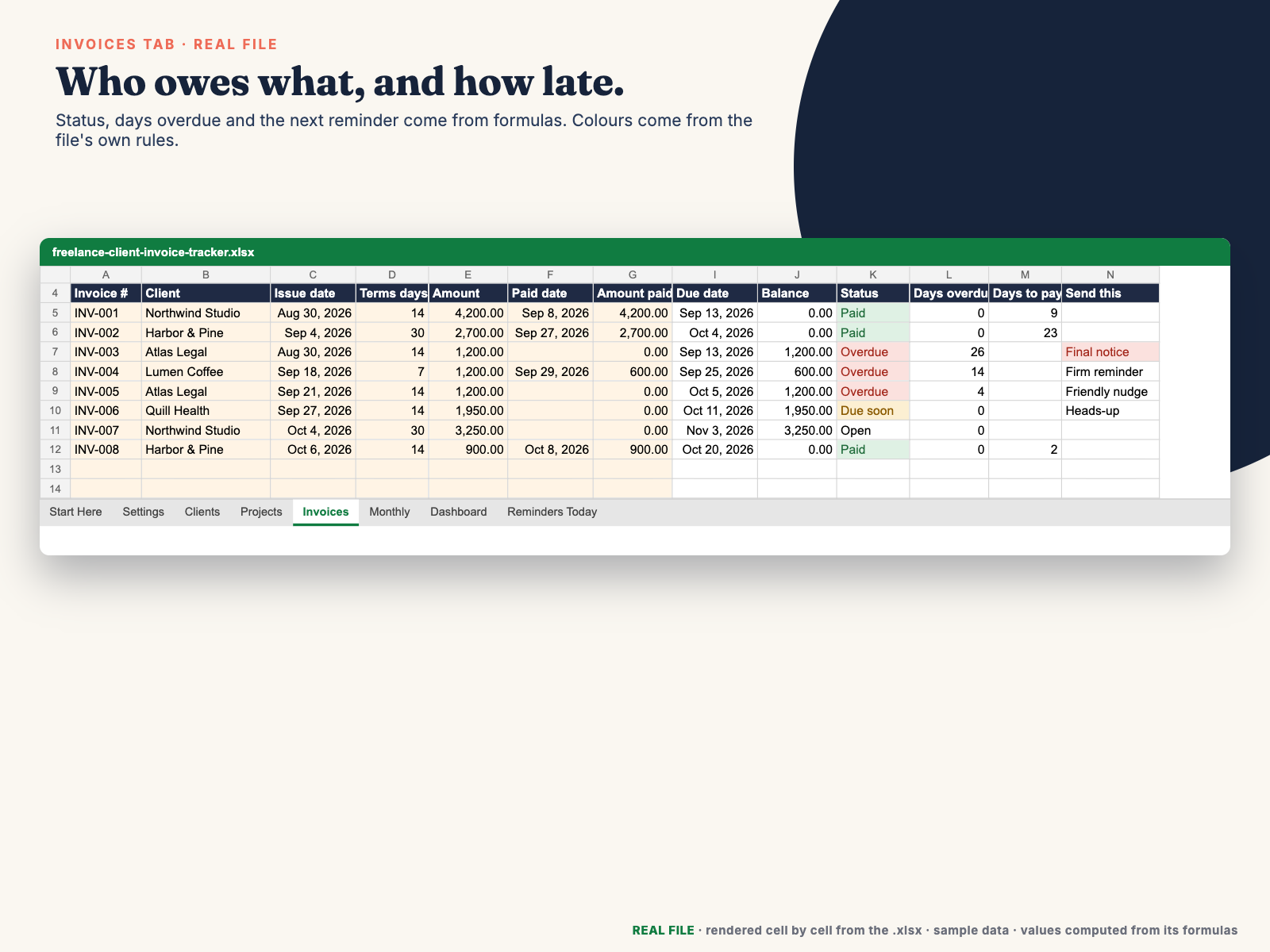
This tracker turns that into a 5-minute Monday routine. Log your clients, projects and invoices in one workbook. The Invoices tab works out due dates, balances, statuses and days overdue. The Reminders Today tab lists up to 15 invoices that need an email today, most overdue first. Each one has a subject and body already filled in from 4 templates you edit once in your own voice. Copy, paste, send. When a client pays, type the paid date and amount: the status turns to Paid and the reminder disappears. No scripts, no add-ons, no account to connect: it works in Excel 2016+ and Google Sheets.
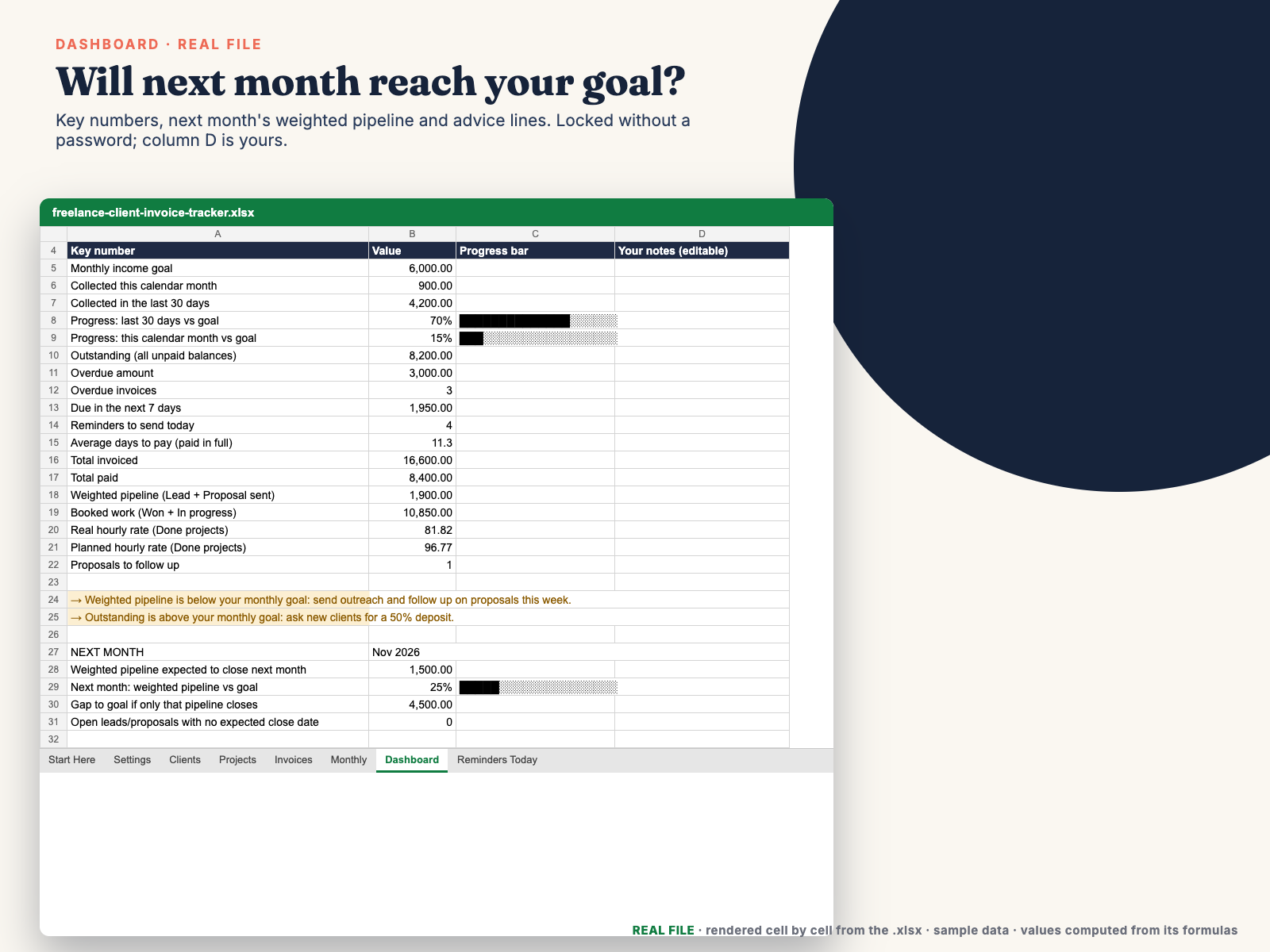
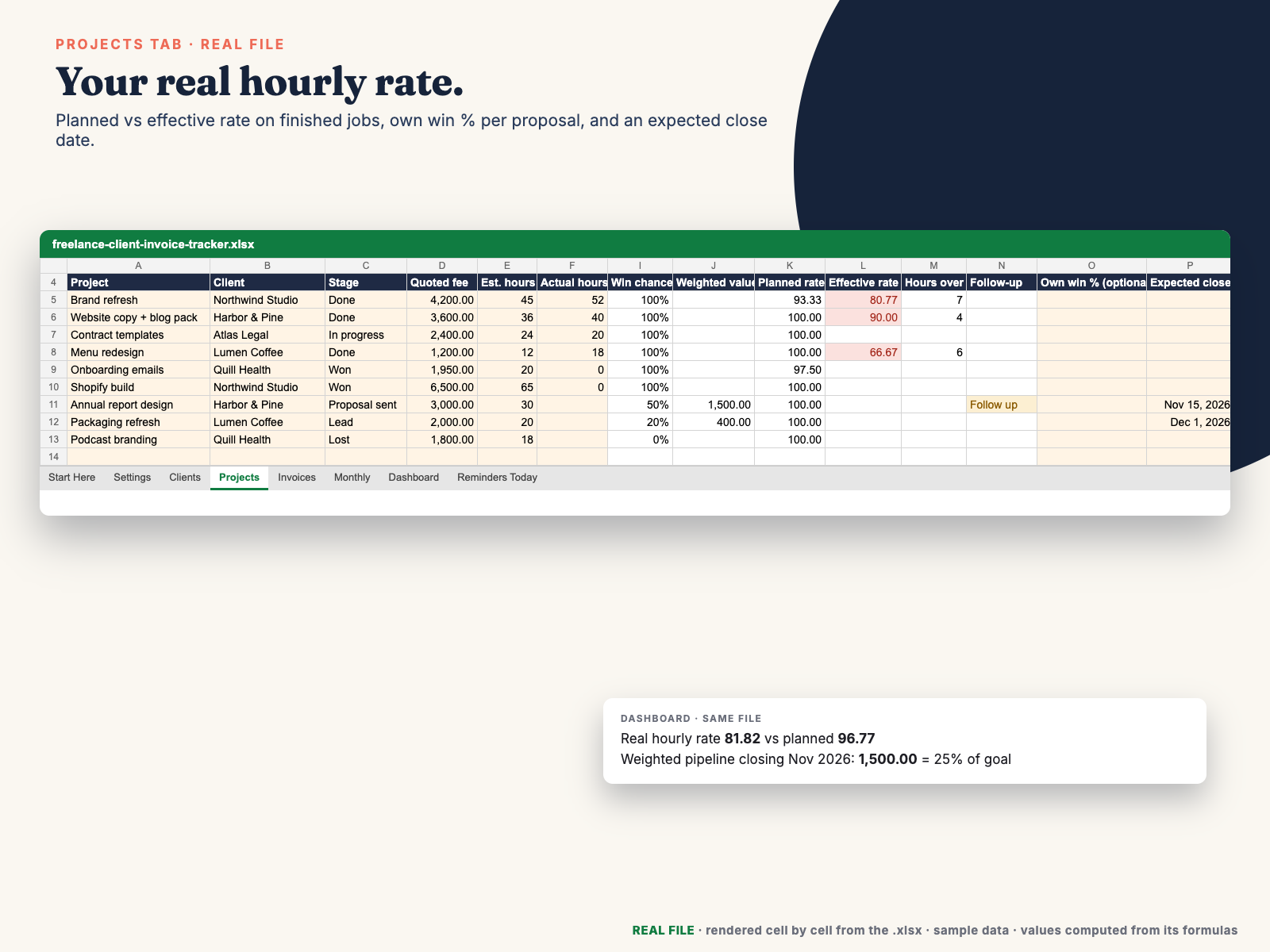
The same file answers "will next month be OK?". Every lead and proposal gets a win chance (from its stage, or your own % for that proposal) and an expected close date. The Dashboard shows the weighted pipeline expected to close next month, the gap to your goal, booked work, money collected in the last 30 days, and the real hourly rate of finished projects next to the rate you planned. Advice lines tell you when to do outreach, when to ask for deposits, and which proposals still need a close date.
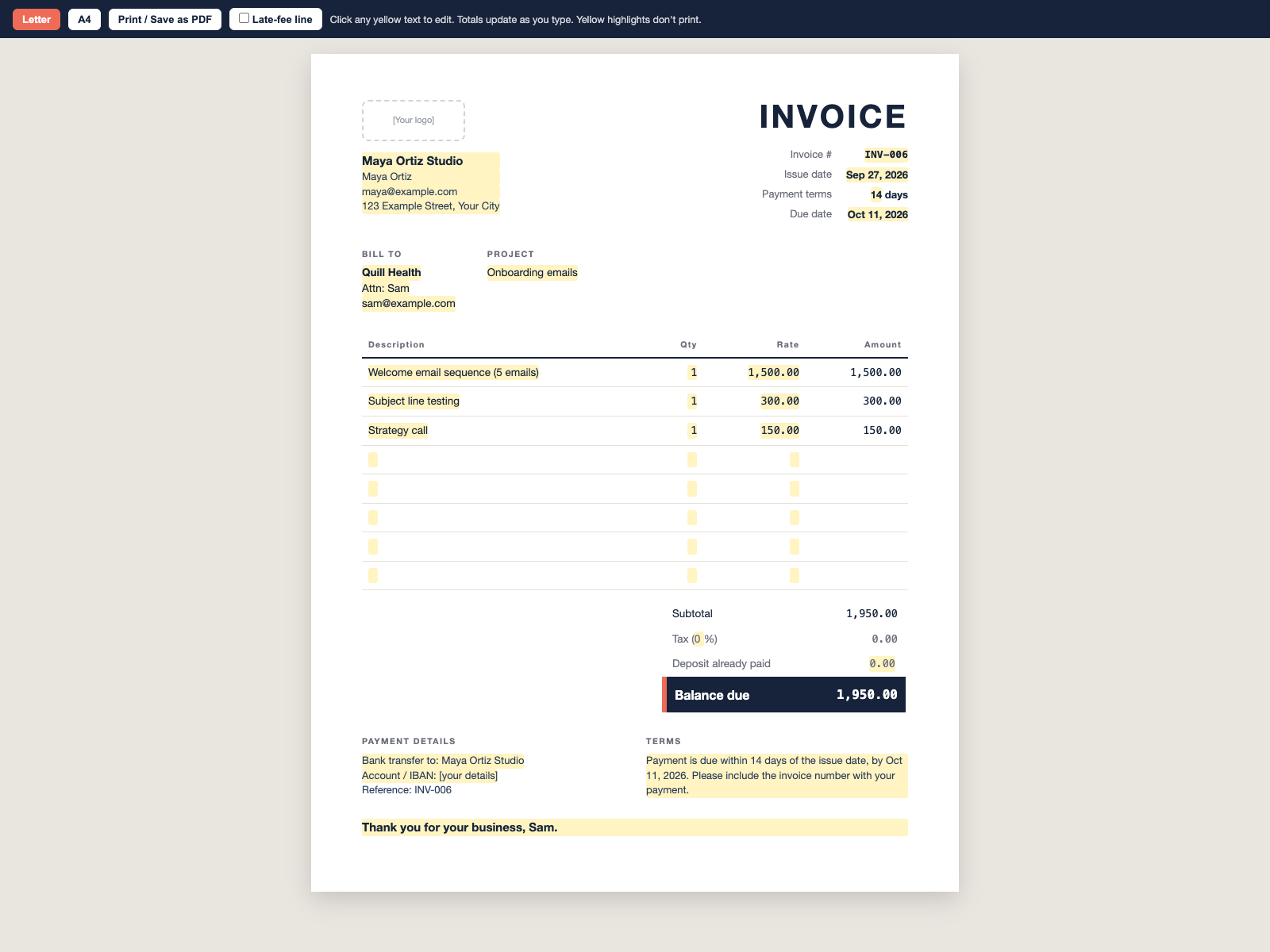
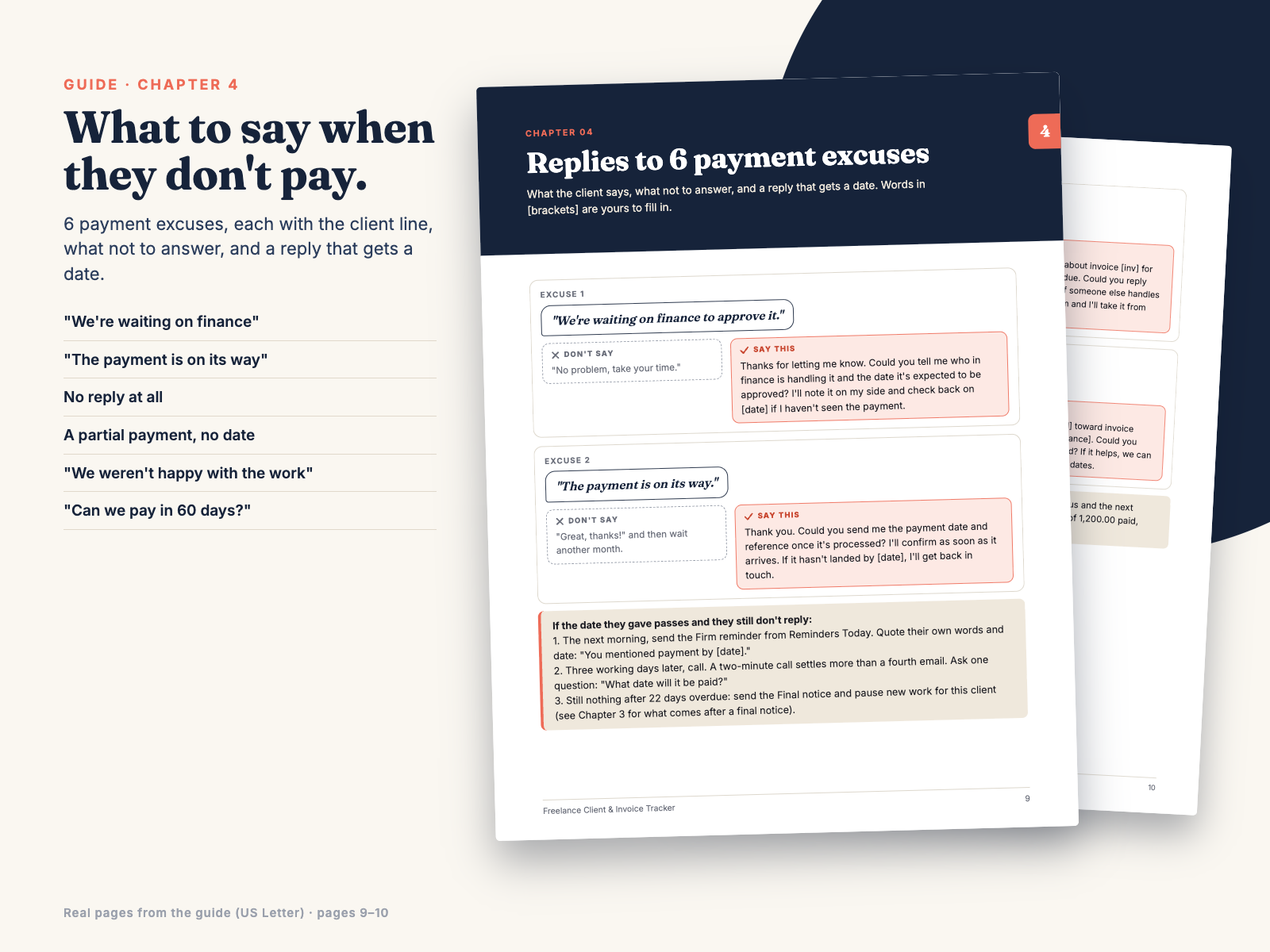
The 18-page guide (Letter and A4) covers setup in 10 minutes, the Monday check, the full reminder ladder, what to do after a final notice, replies to 6 payment excuses with next steps if the client goes quiet, deposit and terms wording, and an example late-fee clause. The invoice template gives clients a clean 1-page invoice with the balance due in bold.
Honest limits: there are no native charts in the file. The Monthly tab shows text bars, and the guide shows how to add a real chart in about 30 seconds. It doesn't estimate taxes or track expenses. It's a tracking tool, not accounting, tax or legal advice, and it doesn't send emails for you.
Dropdowns: Source, Stage, Terms and Late fee. Colours: green Paid, amber Due soon / Follow up, red Overdue / Final notice; the cell always shows the word too. Input cells are cream, formula cells are white. Dashboard is locked with no password (one click to unlock, and its notes column stays editable); every other tab is unlocked.
Does it work in Google Sheets?
Yes. Upload the xlsx to Google Drive and open it with Sheets, or use File > Import. Formulas, dropdowns and colours come along.
Does it send the reminders?
No. It writes them; you copy and send them from your own email, so nothing needs access to your inbox.
Can I set a different win chance for one proposal?
Yes. Stage percentages live on Settings; type your own % in the Projects "Own win %" column to override it for that row.
Are there charts?
No native charts. Monthly has text bars, and the guide FAQ shows how to add a chart in about 30 seconds (Monthly isn't locked).
Free invoicing apps already send reminders. Why buy this?
If you already invoice every client through an app with automatic reminders and you're happy with it, you may not need the reminder side. This tracker is for freelancers who invoice from Word, Canva or PayPal, or who want each follow-up to come from their own inbox in their own words. It also covers what an invoicing app doesn't: a weighted pipeline against your monthly goal, and planned vs real hourly rate per project. It's a one-time $12 with no account to connect.
Who is Hustle Studio, and how do I get the files?
Hustle Studio is a small independent shop making templates and toolkits for freelancers (see our other products and free guides). Checkout runs through Waffo Pancake, our merchant of record. Right after payment you are sent to a download page with the ZIP and a link for each file. Bookmark it to download again later.
Will someone answer if something goes wrong? Will it be updated?
Yes. Email chenphien@gmail.com and we reply within 2 business days. If we fix a bug or improve the files, the download page gets the new version.
What if it's not for me?
Email support within 14 days of purchase for a full refund, no questions asked. If a file won't open or a formula doesn't work, that's a full refund too. See Terms.
$12.00 USD, one-time
Buy now: $12Secure checkout by Waffo Pancake (merchant of record), receipt by email. 14-day full refund.