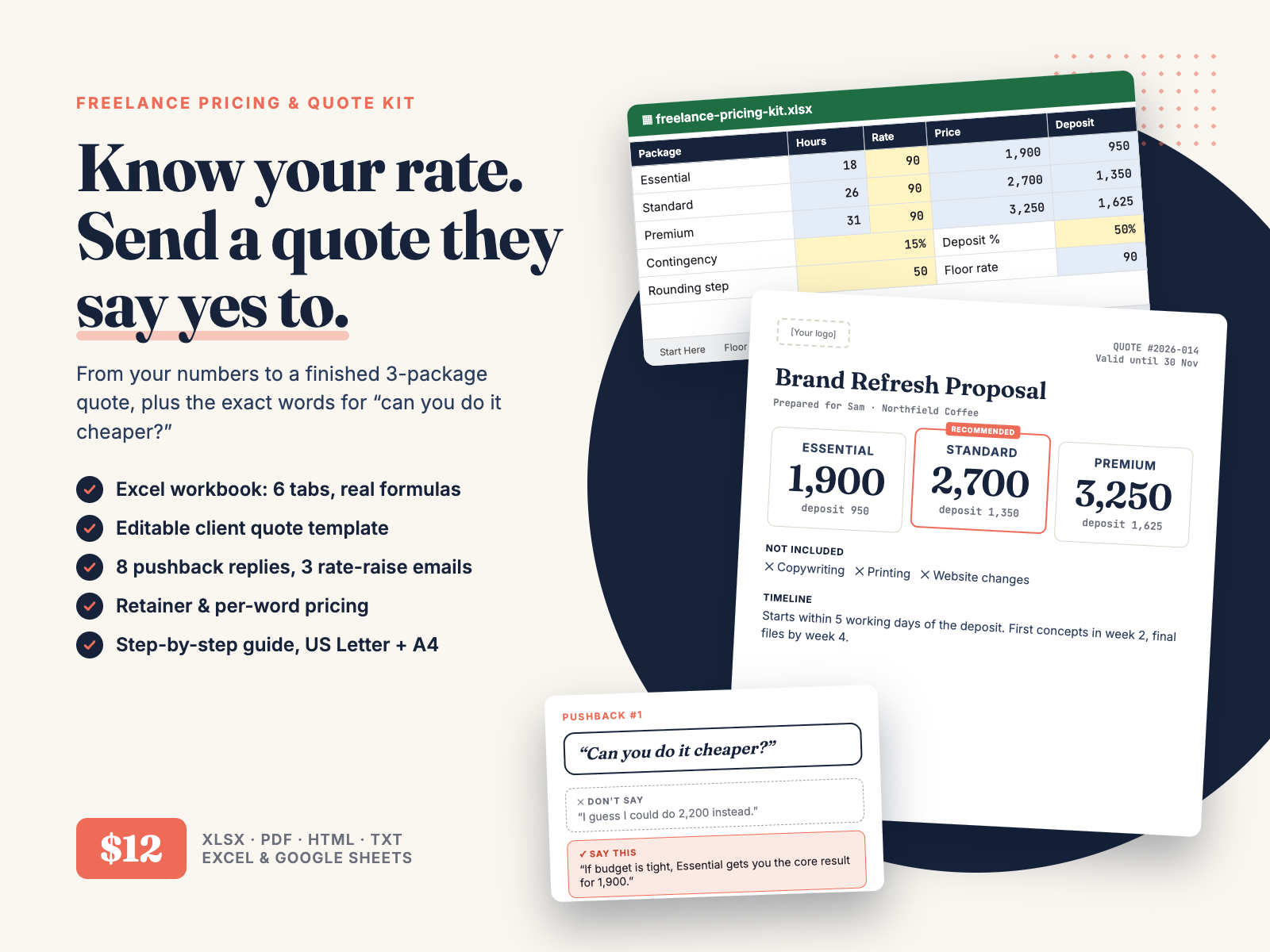
Know your rate. Send a three-package quote clients say yes to. Keep your price when they push back, and raise it with the math done first.
$12.00 USD, one-time, instant download
Buy now: $12Secure checkout: payment is handled by Waffo Pancake, our merchant of record, and accepts common debit and credit cards. We never see your card details. After payment you go straight to the download page.
14-day refund, no questions asked. Email chenphien@gmail.com within 14 days of purchase and we refund you in full through Waffo Pancake (see Terms).
Satisfaction guarantee: if the quote template or the calculator doesn't work for you, on your computer or for your kind of work, you get a full refund.
New shop, honest about it. Hustle Studio is a small new shop, so this kit has no reviews yet and we won't invent any. Instead, everything below is from the real files: guide pages, workbook tabs rendered from the .xlsx, real screenshots of the calculator and a real screen recording. Questions before or after you buy go to the same email, and we reply within 2 business days. Buyers get updated versions of the kit from the same download page.
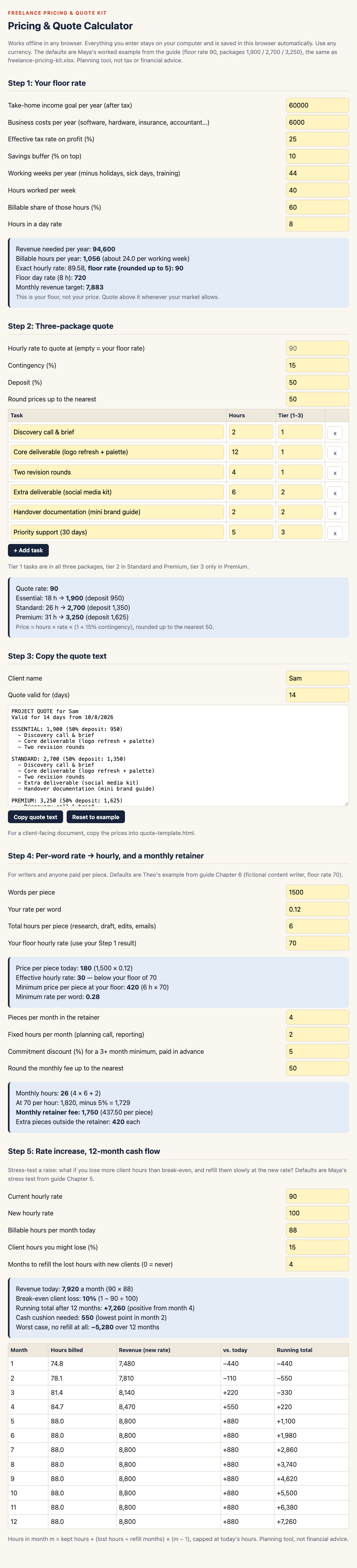
Real recording, silent: changing inputs in pricing-calculator.html (floor rate, packages, per-word and retainer, 12-month cash flow), then editing quote-template.html (price, client name, deposit 40%).
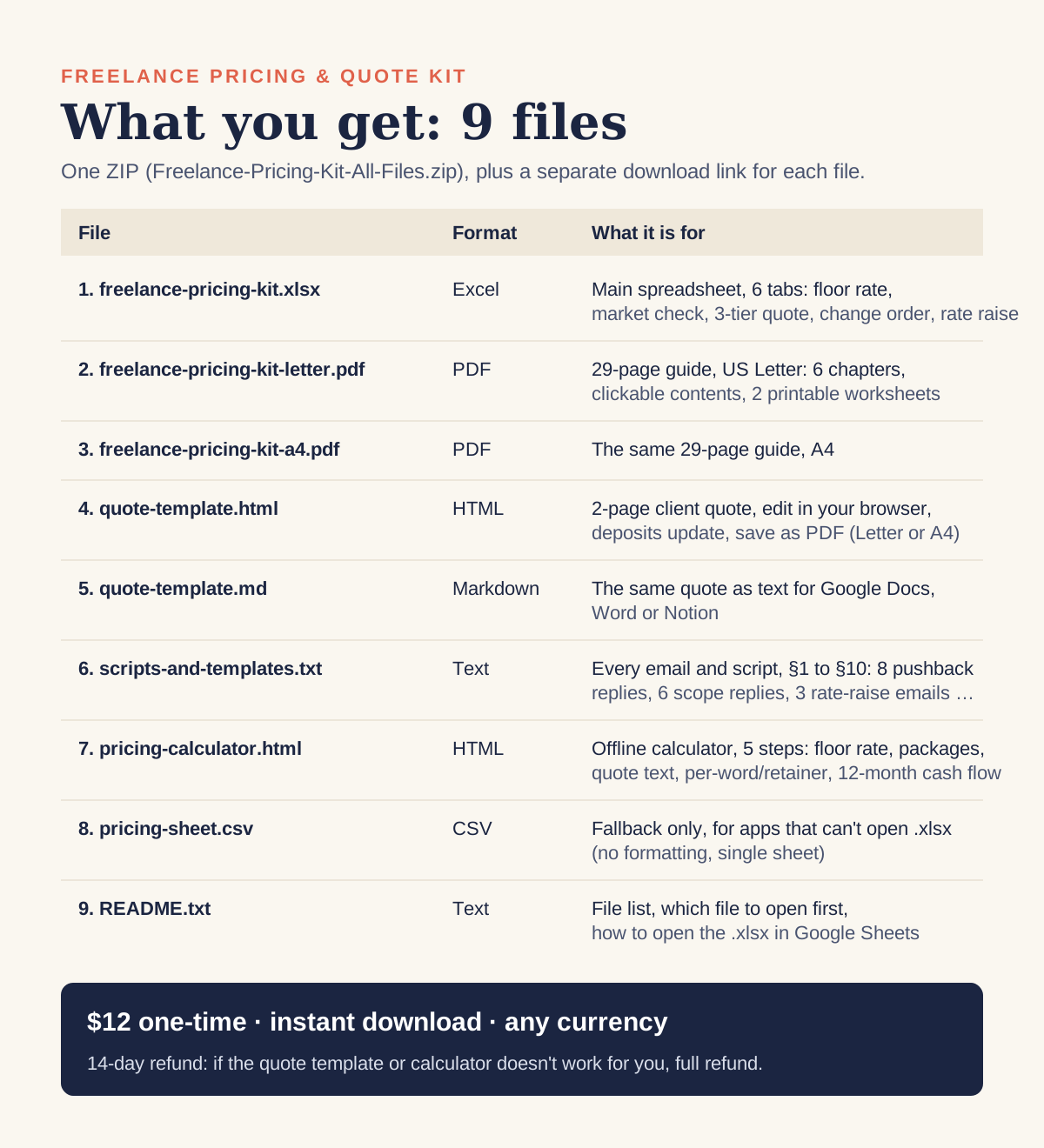
Everything comes in one ZIP, Freelance-Pricing-Kit-All-Files.zip, with these 9 files. The download page also has a separate link for each file.
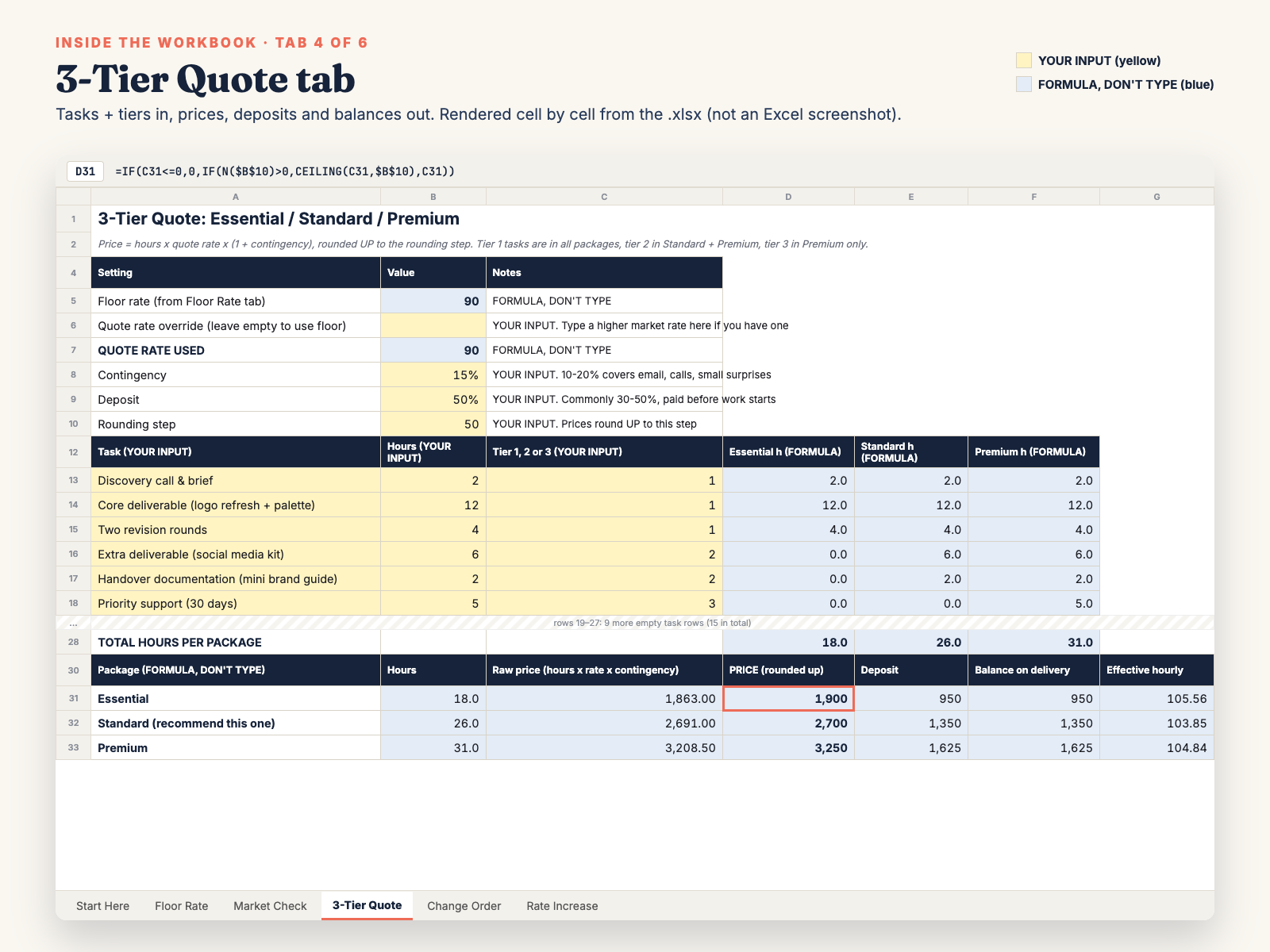
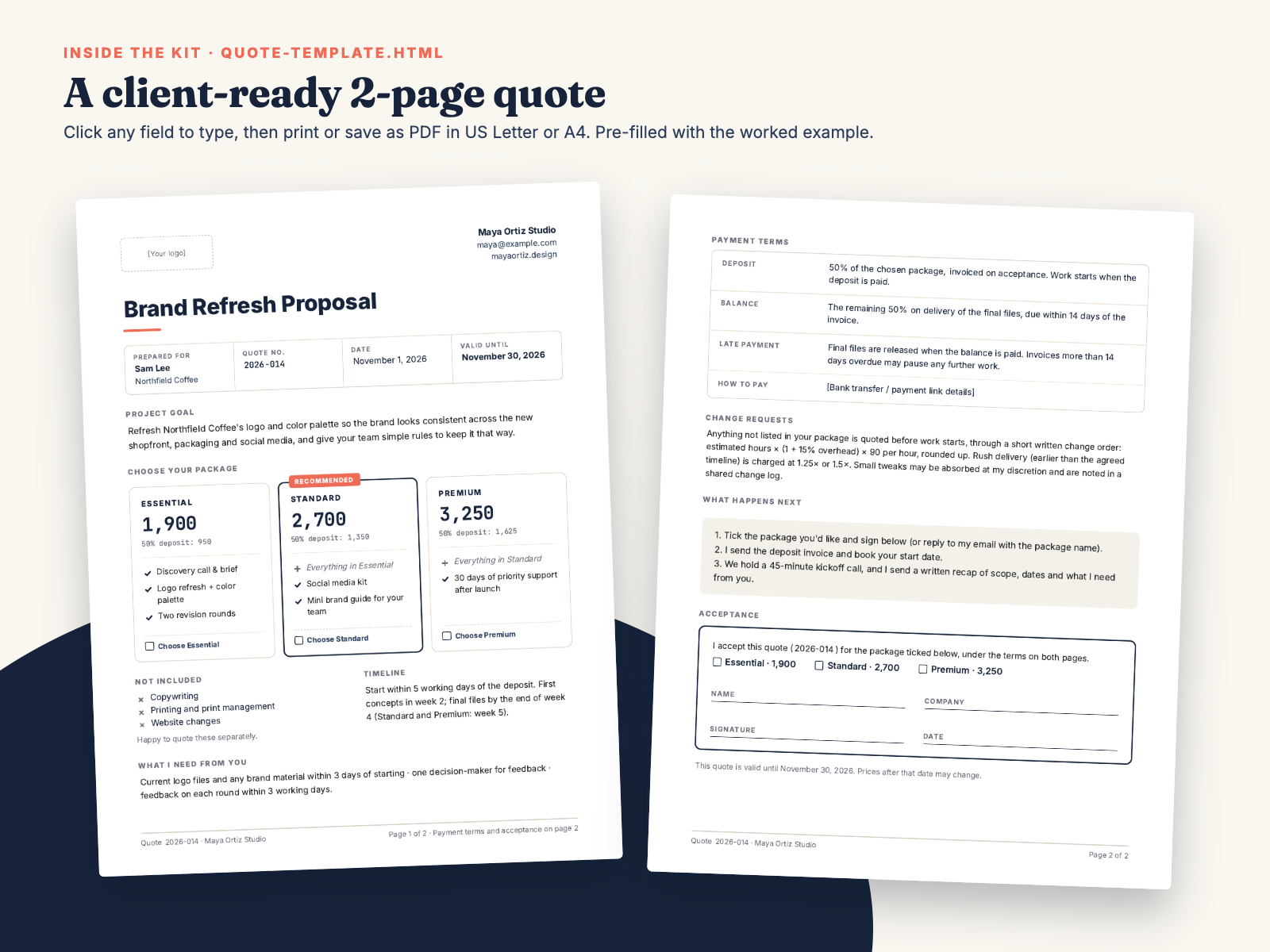
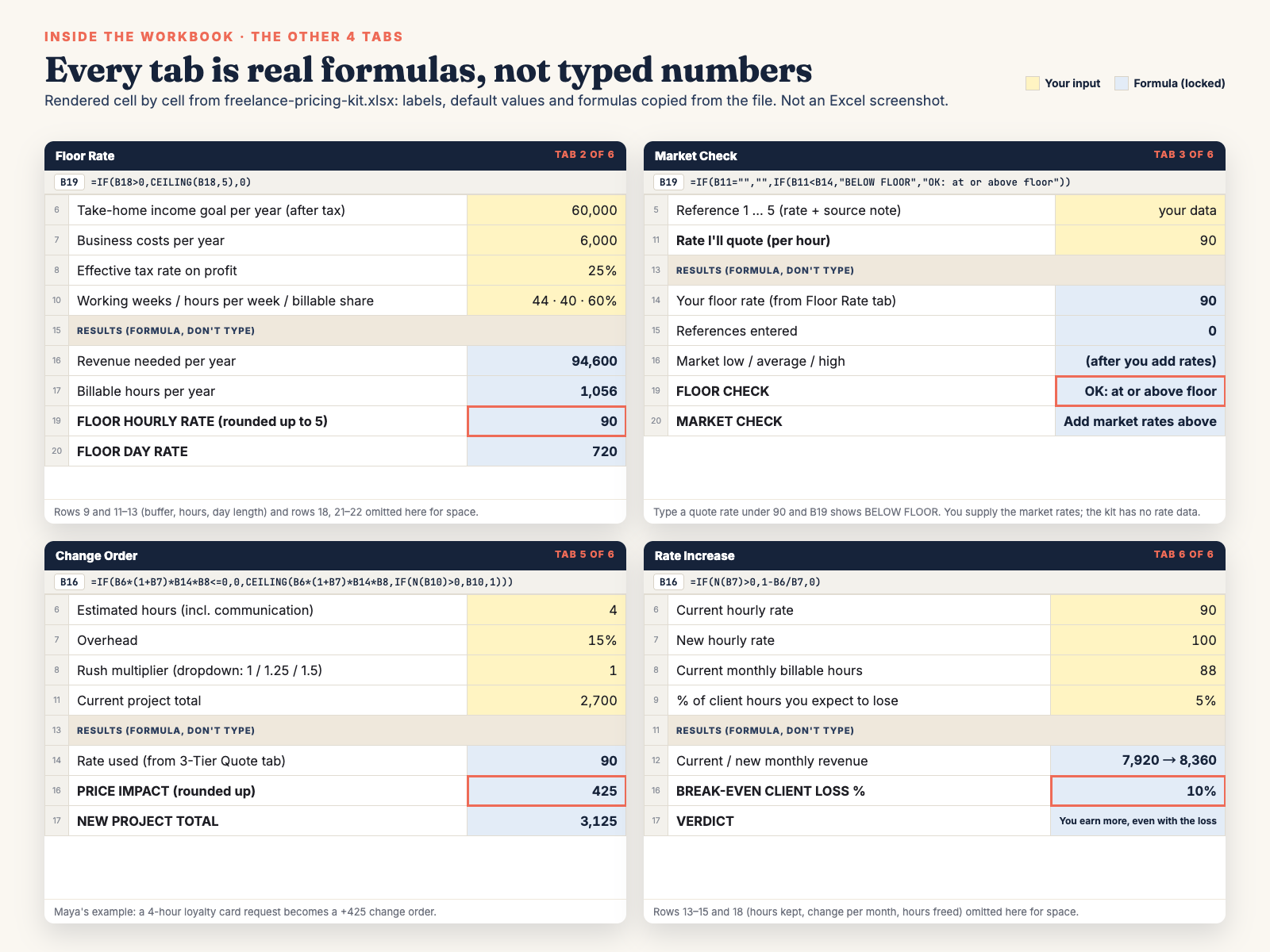
freelance-pricing-kit.xlsx: the main spreadsheet. Excel workbook with 6 tabs: Start Here, Floor Rate, Market Check, 3-Tier Quote, Change Order, Rate Increase. Opens in Excel and Google Sheets.freelance-pricing-kit-letter.pdf: 29-page guide, US Letter. 6 chapters, clickable contents, 2 printable worksheets.freelance-pricing-kit-a4.pdf: the same 29-page guide, A4.quote-template.html: 2-page client quote, editable in any browser, deposits calculated automatically, prints to Letter or A4.quote-template.md: the same quote as text, for Google Docs, Word or Notion.scripts-and-templates.txt: every script and email as plain text, sections §1–§10: 1 quote email, 1 scope-of-work section, 1 kickoff email, 1 change order, 1 change log, 6 scope replies, 8 pushback replies, 3 rate-increase emails, 6 rate-increase replies, 1 retainer offer email (with the per-word and retainer math).pricing-calculator.html: offline browser calculator in 5 steps: floor rate, 3 packages, copy-ready quote text, per-word to hourly + monthly retainer fee, 12-month rate-increase cash flow.pricing-sheet.csv: fallback only. A plain CSV of the floor-rate and package math for apps that can't open .xlsx. No formatting, no colours, no extra tabs. Use the .xlsx if you can.README.txt: file list, which file to open first, how to open the .xlsx in Google Sheets.All images come from the real files. Workbook previews are rendered cell by cell from the .xlsx (values and formulas copied from it); they are not Excel screenshots. Calculator images are real browser screenshots.
The text of the guide's "How to use this kit" and contents pages, copied from the PDF so you can see the structure before you buy.
Page 2 · START HERE
This kit takes you from your own numbers to a finished three-package quote you can send today, plus the words to use when the client replies.
Your first 30 minutes
Meet Maya. Every example uses one fictional freelancer: Maya Ortiz, a brand designer two years in. Her numbers are the default values in the workbook and the calculator, so you can check every step.
Any currency. All amounts in this kit are currency-neutral. "1,900" means 1,900 of your currency: dollars, pounds, euros or anything else.
Page 3 · CONTENTS
| Section | Page | |
|---|---|---|
| • | How to use this kit Which file to open first, what's inside | 2 |
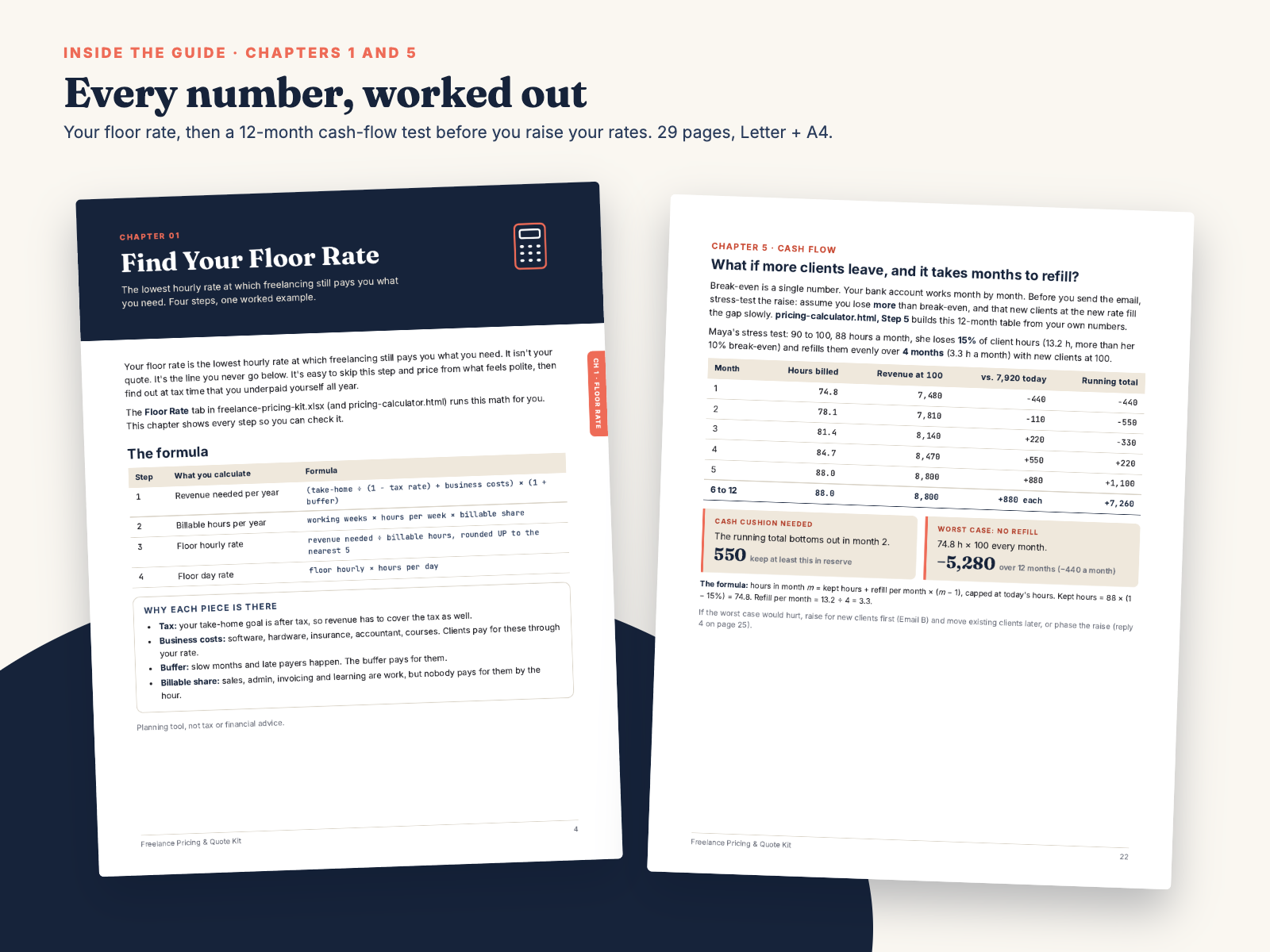
| 1 | Find Your Floor Rate The lowest rate that still pays you | 4 |
| 2 | Quote Three Packages Essential, Standard, Premium; the quote email | 7 |
| 3 | Scope & Change Orders Scope section, kickoff recap, change order, log, scripts | 12 |
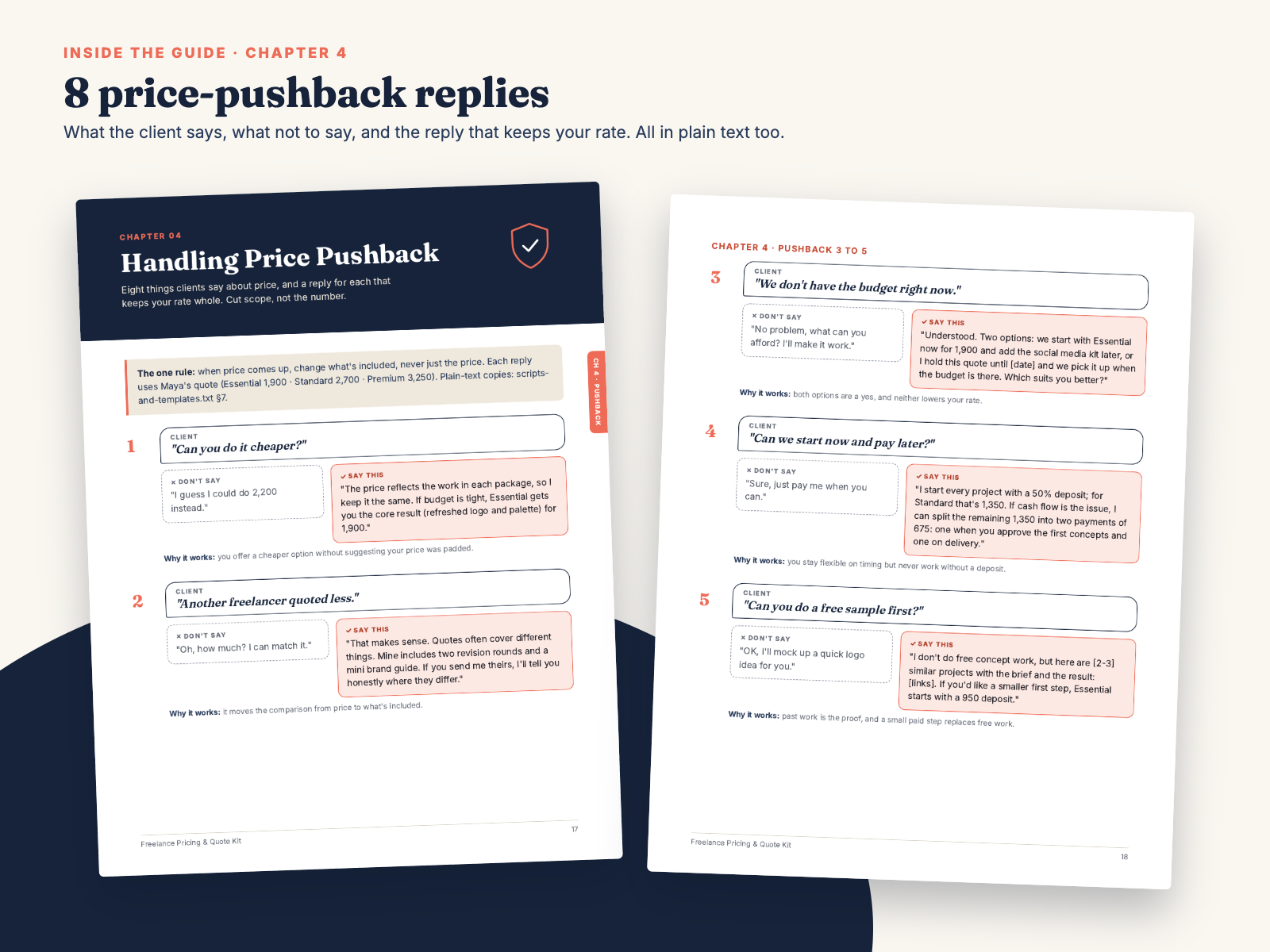
| 4 | Handling Price Pushback Eight client lines, what not to say, what to say | 17 |
| 5 | Raising Your Rates Break-even, 12-month cash-flow test, 3 emails, 6 replies | 20 |
| 6 | Retainers & Per-Word Rates Per-word to hourly, monthly retainer fees, offer email | 26 |
| • | Worksheet: Your numbers Floor rate by hand | 28 |
| • | Worksheet: Your quote Task table and package prices by hand | 29 |
Every email and script is also in scripts-and-templates.txt, numbered §1 to §10 in the same order as this guide.
Free rate calculators are everywhere. What they don't tell you is what to say when the client answers "that's a bit much", or what happens to your income in the months after you raise your rate. This kit covers the whole path: your numbers, your rate, a quote you can send, the words for when they push back, and the plan for charging more.
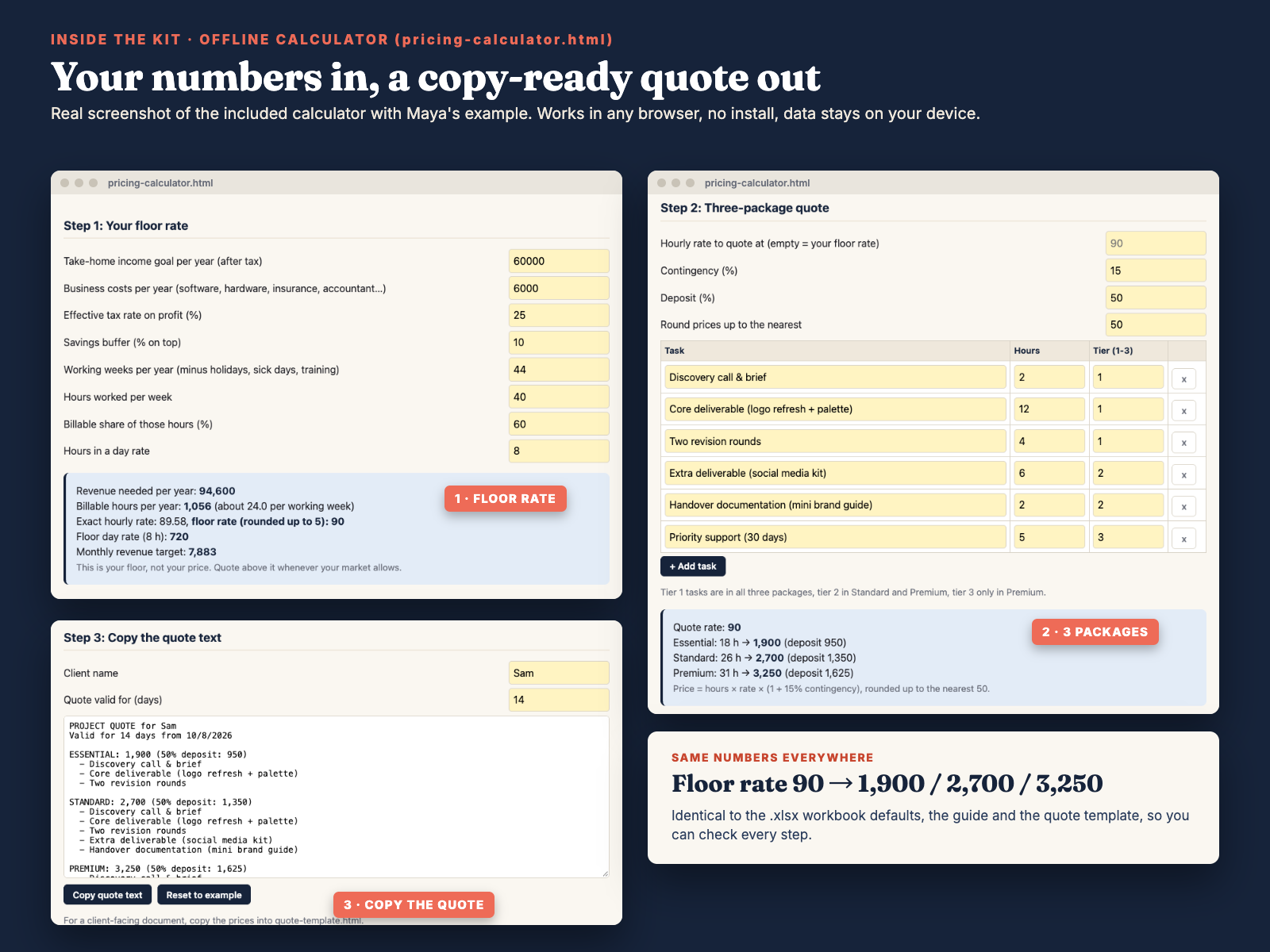
Start with your floor rate. Type your income goal, business costs, tax rate and an honest share of billable hours into the workbook (or the offline browser calculator). You get the lowest hourly and day rate that still pays you. In the worked example, Maya, a brand designer, needs 94,600 a year. Spread over her 1,056 real billable hours, that makes her floor 90 an hour. Divide the same 94,600 by the usual 2,080 hours (52 weeks × 40) and you'd get about 45, half of what she needs.
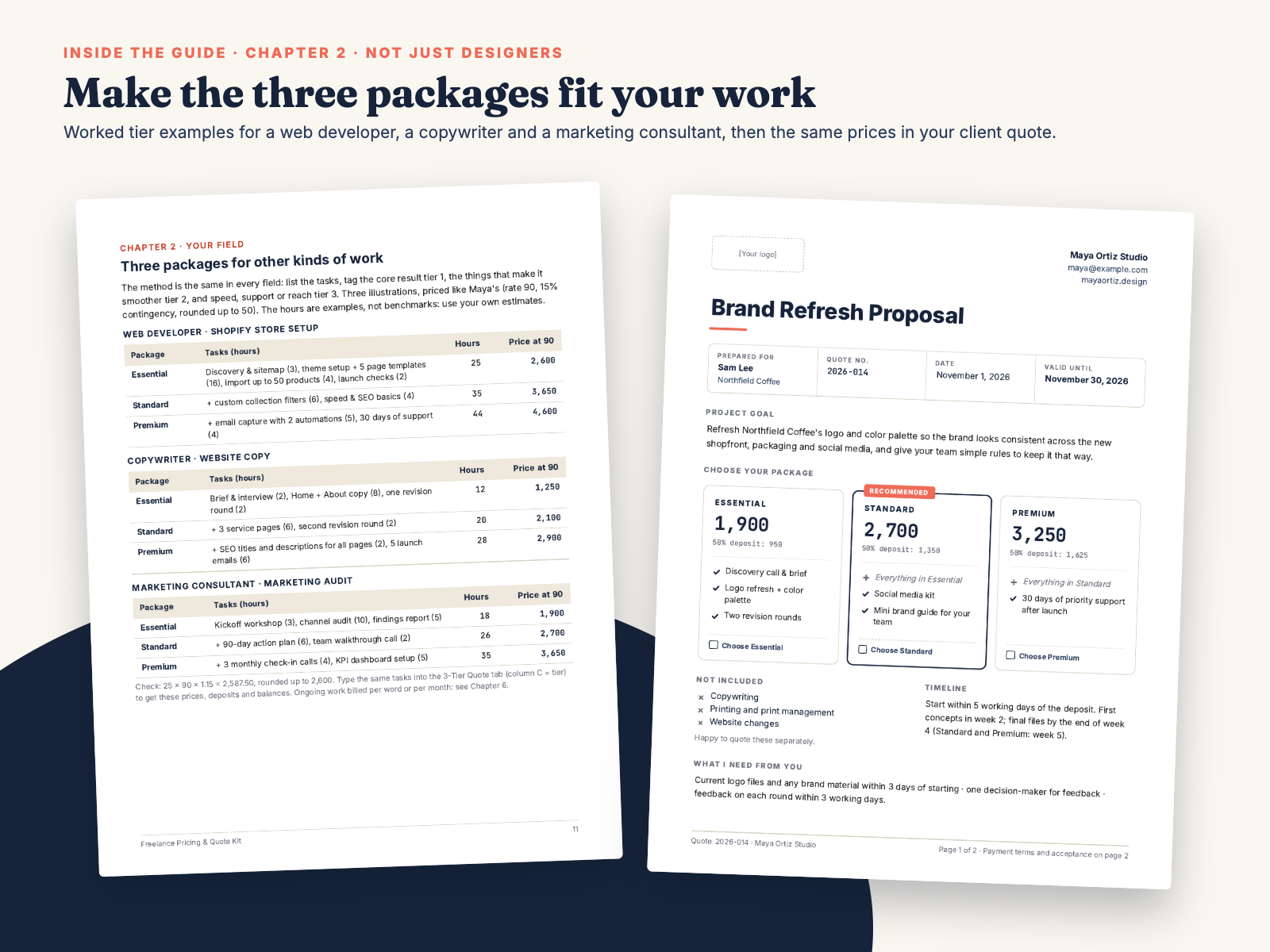
Turn it into three packages. List the project's tasks and tag each one Essential, Standard or Premium. The 3-Tier Quote tab adds contingency, rounds up, and gives you prices, deposits and balances. Maya's brand refresh comes out at 1,900 / 2,700 / 3,250, with 50% deposits of 950 / 1,350 / 1,625. Not a designer? Chapter 2 shows the same method for a Shopify store build, a website copy project and a marketing audit.
Send a quote that looks agency-grade. Paste the prices into the quote template, click any yellow field to edit it, and save it as a PDF. Deposits are calculated from each price and your deposit %. It has a validity date, a "Recommended" package, a "Not included" list and a signature block, so the client can say yes in writing.
Keep your price when they push back. Chapter 4 covers eight things clients say about price. Each one has the weak reply to avoid and a word-for-word reply that changes the scope instead of your rate. Chapter 3 adds the scope-of-work section, a change order, a change log and six scope-creep replies.
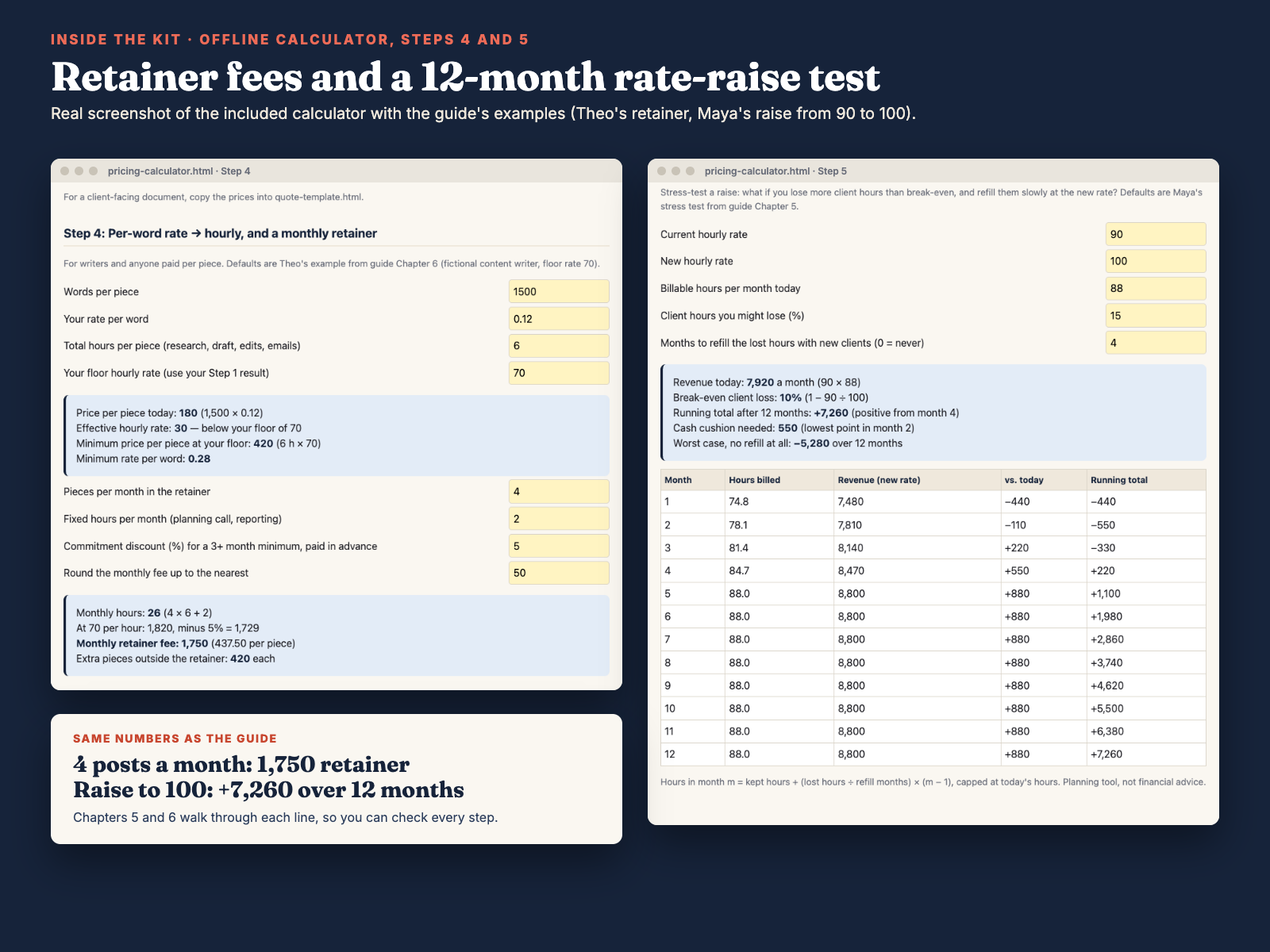
Raise your rates, and see the months after. Chapter 5 starts with the break-even (how much work you could lose and still earn the same), then stress-tests it month by month: lose more clients than break-even, refill the hours slowly, and see the lowest point of your bank balance. Three emails cover existing clients, new clients and retainer clients, with replies to six likely responses, including "can you phase it in?" and no reply at all.
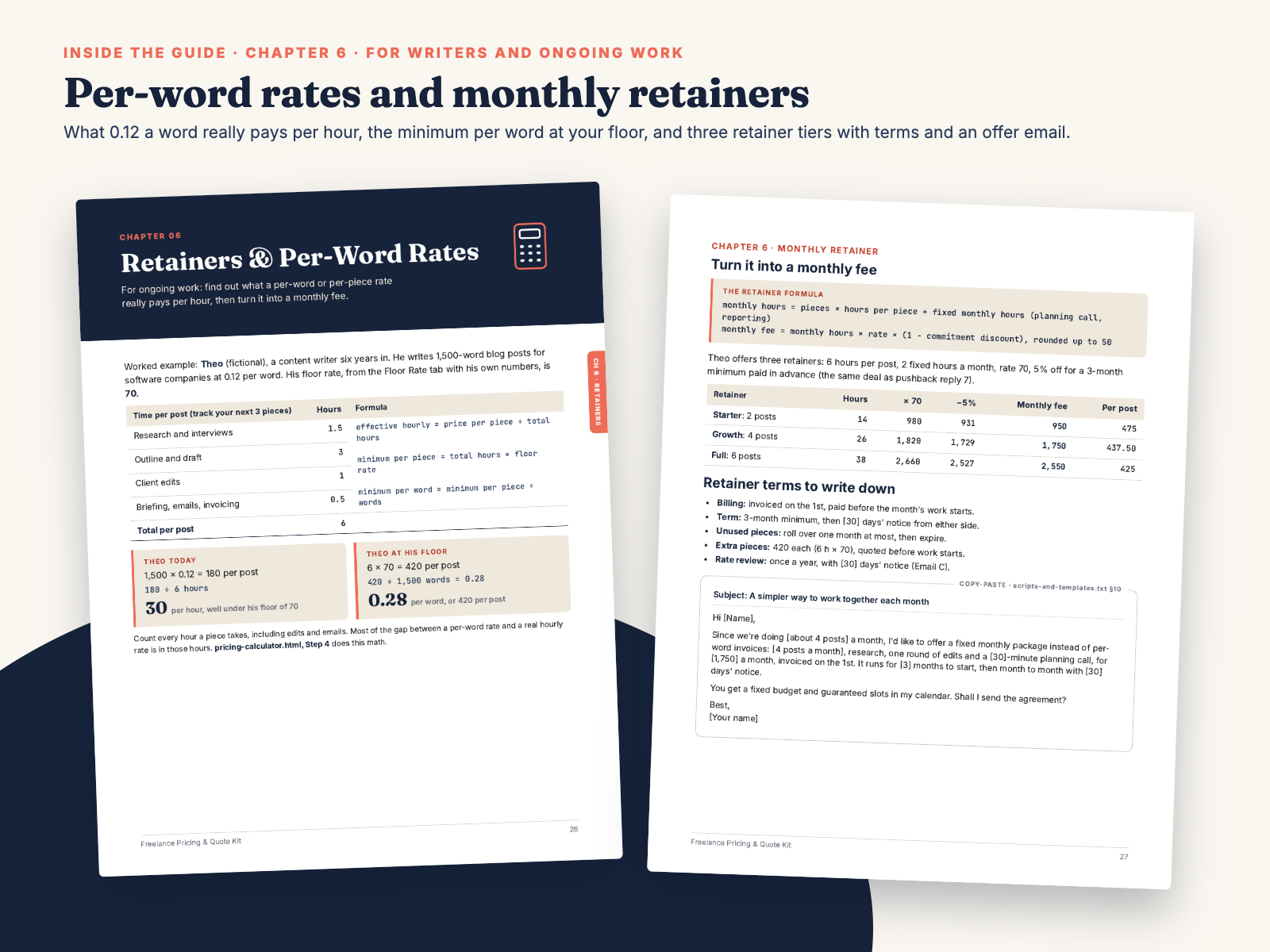
Ongoing work and per-word rates. Chapter 6 and calculator Step 4 show what a per-word rate really pays per hour (in the example, 0.12 a word works out to 30 an hour), the minimum per-word rate at your floor, and three monthly retainer tiers with the terms to write down.
Check it yourself before you trust it. Every number in the guide matches the workbook defaults and the calculator. Amounts are currency-neutral: use dollars, pounds, euros or anything else.
This is a planning tool and set of templates, not tax, legal or financial advice.
Do I need Excel?
No. The workbook opens in Google Sheets (File → Import → Upload). If you have no spreadsheet app, the offline browser calculator does the floor-rate, package, retainer and cash-flow math. The CSV is only a last-resort fallback.
I bill per word or on a monthly retainer. Does this help?
Yes. Chapter 6 and calculator Step 4 convert a per-word rate to an effective hourly rate, give you the minimum per-word rate at your floor, and price a monthly retainer. Email C and the retainer offer email cover ongoing clients.
Does it work with my currency?
Yes. All amounts are currency-neutral. Type your own numbers in your own currency.
Can I edit the quote template without design software?
Yes. Open quote-template.html in any browser, click a yellow field and type. Set the deposit % in the toolbar and the deposits update. Use the Letter or A4 button to save it as a PDF. The highlights don't print.
Who is Hustle Studio, and where do I download the files?
Hustle Studio is a small independent shop that makes templates and toolkits for freelancers (see our other products and free guides). Checkout runs through Waffo Pancake, our merchant of record, not through Etsy or Gumroad. Right after payment you are sent to a download page on this site with the ZIP and a link for each file. Bookmark it to download again later.
What if it doesn't work for me?
Email chenphien@gmail.com within 14 days of purchase for a full refund, no questions asked. That includes the case where the quote template or calculator doesn't work for you. See Terms.
Will you answer questions or update it?
Yes. Email us and we reply within 2 business days. If we fix or improve the files, the download page gets the new version.
$12.00 USD, one-time
Buy now: $12Secure checkout by Waffo Pancake (merchant of record), common debit and credit cards accepted. 14-day full refund.